|
Showing posts with label Utilities. Show all posts
Showing posts with label Utilities. Show all posts
My Data Usage Pro IPA Version 1.3 My Data Usage Pro My Data Usage ProDescription That ability to know how much data used every month ... excellent. That peace of mind and the hard earned money savings every month … perfect indeed. That ability to fend off the scheming ways of telecom providers… priceless!!! An app that enables you to count every last byte you download and hence fend off that scheming telecom provider who is waiting so that you exceed your monthly data limit and he can bilk your hard earned money as outrageously overpriced penalties. If you don't use the data limit to the fullest for fear of exceeding the limit and hence waste the money you pay anyways, this app does the work of counting every byte for you, making it super simple for you to know exactly when you might exceed the limit and hence saving that precious money of yours, month after month, every month. And that Peace of Mind you get. ~~~~~~~~~~~~~~~~ ##Breaking News## ~~~~~~~~~~~~~~~~ ▪ #1 Utility app in UK for New and Noteworthy ▪#6 Utility app in Canada for New and Noteworthy ▪#7 Utility app in USA for New and Noteworthy ▪This app now has Data Doctor with Smart Analysis and Early Warning System Features. Please see "Whats new in version 1.3" for details. ▪iPad support added. This app is designed for both iPhone and iPad and will run natively on both. Buy once, use everywhere. The Highlights of this app are: ✓The setup is a breeze. All you ever need is to tell (just once.. at the time of setup of app) the monthly data limit (example, 200 for 200 MB monthly data plan) and the monthly billing cycle start date (example, 5 if your billing cycle starts on 5th of every month). Yes, thats all… and the app will take care of the rest. ✓This app has in-built algorithm to automatically detect how much data is used when on cellular network like 3G, 4G, Edge, GSM, or any other cellular network as well as how much data is used on the wifi- network. ✓It tracks your monthly data usage and shows the amount used as color coded progress bar. Its green when you are safely within limit, it becomes orange when you are nearing the limit and red when you are just about to cross the limit or have crossed the limit. Its super easy and super useful. If you love details, it also tells you how much data has been used this month and what percentage of data limit is used up. ✓This app has Data Doctor feature that does Smart-Analysis on your usage patterns and predicts when you might exceed the data limit. So that you can better organize your data usage. ✓Data Doctor's Early Warning System has color coded warnings built in that will let you know when you are in danger of crossing the data-limit and will also suggest how to optimally use your data-plan so as to not cross the data limit and yet use the available data limit to the fullest. Please refer to "What's new in Version 1.3" below for details. ✓A friend borrowed your iPhone/iPad/iPod for sometime and you want to check whether he/she downloaded whatnot and messed up your monthly data download limit, no problem. This app has a feature called "Since Last Run" that helps you catch exactly these scenarios and help you find out now rather than at the end of month (after receiving the bill) that how much data was downloaded since you last ran this app. ✓If you don't want to be saddled with remembering when to reset the app's monthly data usage counter, no problem. Just enable the monthly reset reminder in the settings. And it will remind you to reset the counter at the start of very billing cycle. Of course you can turn off/on the reminders anytime. ✓This app will work with any telecom provider as it gathers all its data from inside the device WITHOUT ever having to login anywhere. Note: Please email support queries instead of leaving them as review comments. What's new in Version 1.3 iPad support added. This app now runs natively on iPad. Buy once and run everywhere (iPhone, iPad, iPod Touch) Data Doctor* feature added. This feature enables Smart Analysis and Early Warning System. ✓ Data Doctor does Smart-Analysis on your usage patterns and predicts when you might exceed the data limit. So that you can better organize your data usage. ✓ Data Doctor's Early Warning System has color coded warnings built in that will let you know when you are in danger of crossing the data-limit and will also suggest how to optimally use your data-plan so as to not cross the data limit and yet use the available data limit to the fullest. ⁃When the Data Doctor button is green it means you are safely within limit and will not cross the data limit before month end. ⁃When the Data Doctor button becomes red, it means you are in danger of crossing your data limit before month-end. ⁃You can tap on Data Doctor button to get Smart Suggestions for optimal usage *The Data Doctor button shows up on the top right corner of the app. This button will be visible only after three days into the current billing month as the Data Doctor needs at least three days worth of usage data to run its Smart-Analysis. This app is designed for both iPhone and iPad. Category: Utilities Version: 1.3 6.9 MB LANGUAGES: English, Arabic, Chinese, Dutch, French, German, Greek, Hebrew, Italian, Japanese, Norwegian, Polish, Portuguese, Russian, Spanish, Swedish REQUIREMENTS: Compatible with iPhone, iPod touch, and iPad. Requires iOS 4.0 or later. Download here SatFinder IPA Version 1.4 SatFinder SatFinderDescription Set up satellite antennas correctly in seconds. This is made possible by the SatFinder for iPhone 3GS and iPhone 4. The SatFinder makes it possible to quickly calibrate any TV satellite antenna in four easy steps: 1. Set the height and width of the satellite antenna. 2. Choose a TV Satellite. 3. Test if there is a direct line to the satellite. 4. Measure and set the azimuth and elevation. Ready! It's not possible to more easily configure a satellite antenna. Warning: this app requires GPS, the compass, the accelerometer and the videocamera. This is why this app will only work on the iPhone 3GS and iPhone 4! What's new in Version 1.4 - Support Flat Dishes - accustic messages - new Languages (Nederland, Turkey, Russia) Category: Utilities Version: 1.4 17.3 MB LANGUAGES: English, Dutch, French, German, Italian, Russian, Spanish, Turkish REQUIREMENTS: Compatible with iPhone, iPod touch, and iPad. Requires iOS 4.0 or later. Download here AccuFuel IPA Version 1.2.8 AccuFuel AccuFuelDescription AccuFuel™ Fuel Efficiency Tracker is a powerful tool that makes monitoring your vehicle's fuel efficiency simple and fun. Is your SUV guzzling gasoline? Is your fuel efficient hybrid saving your money? Can you beat a rating of 32? With AccuFuel™, you'll instantly see how your driving habits affect your fuel efficiency. If you are hypermiling because of rising gas prices, use AccuFuel™ as a gauge to track your progress. Track multiple vehicles as well and see them just by swiping your finger across the screen. View your mileage in MPG (U.S.), MPG (UK), L/100km, or km/L! In addition, use the standard or trip odometer. More screenshots and information are available on the Appigo website. Note: AccuFuel is incorrectly identified on Walmart's iPhone 3G Sales Display as My Liberty. What's new in Version 1.2.8 New in AccuFuel 1.2.8: ✔ Built using iPhone OS 3.0 SDK (iPhone OS 3.0 or newer required) Category: Utilities Version: 1.2.8 0.6 MB LANGUAGES: English, French, German, Italian, Japanese, Spanish REQUIREMENTS: Compatible with iPhone, iPod touch, and iPad. Requires iOS 3.0 or later Download here A Video Safe - Stash Your Private Videos! IPA Version 1.0 A Video Safe - Stash Your Private Videos! A Video Safe - Stash Your Private Videos!Description Video Safe gives you the perfect place to stash and organize your PRIVATE videos. Have tons of video? No worries. Video Safe is built to handle large libraries! Unlike the others: ✔ Protect all supported videos! ✔ Create Unlimited amount of media Folders ✔ Airplay Ready ✔ Select multiple videos for Import at once ✔ Retina Support ✔ Import videos in Full Resolution (Unlike others) ✔ USB Export and Import ✔ TV Out ✔ Many Other Cool Features! Category: Utilities Version: 1.0 5.0 MB LANGUAGES: English REQUIREMENTS: Compatible with iPhone, iPod touch, and iPad. Requires iOS 4.0 or later. Download here SpeedTouch : The Best Home Screen Shortcuts IPA Version 1.2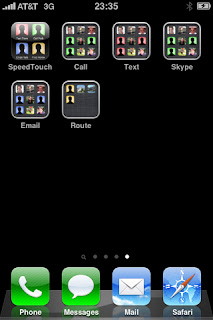 SpeedTouch : The Best Home Screen Shortcuts SpeedTouch : The Best Home Screen ShortcutsDescription This is the Home Screen shortcut application you've been waiting for! SpeedTouch allows you to add shortcuts to your home screen for phone calls, text messages, emails, video chats, and destinations (not all types are available on all devices). It's an easy process: 0. Start SpeedTouch. 1. Select a contact from your address book. 2. Select phone number, email, or street address contact information. 3. Choose a shortcut to make based on the information selected and software/device configuration. 4. A home screen shortcut is added with the contact's picture or a default icon if none is available. An Internet connection is required when creating the shortcut, but not when using the shortcut later. Your contact's information passes through our server only once to create the shortcut. We do not store or share your information. Please send us your questions, problems, or reason for rating the application less than 4 stars and we'll respond quickly! Exciting new features are coming soon! What's new in Version 1.2 We've fixed an issue with some international phone numbers, added support for FaceTime, and added high-resolution graphics for the retina display. RESPONSES TO REVIEWERS: - Thanks for your support! - We use the picture for the contact as the picture for the shortcut. - The "+" is seen in older versions of iOS and SpeedTouch. It's the box with an arrow now. - We'd love to close Safari when we're done, but we can't. - We're working on adding a new approach for URL scheme handling... Stand by for support of other applications (like Whistle and TomTom). - For quicker or personalized responses, please use our support email address support@speedtouchapp.com. This app is designed for both iPhone and iPad. Category: Utilities Version: 1.2 0.3 MB LANGUAGES: English REQUIREMENTS: Compatible with iPhone, iPod touch, and iPad. Requires iOS 3.1.3 or later Download here iPocketFan the first real mini-fan IPA Version 2.0 iPocketFan the first real mini-fan iPocketFan the first real mini-fanDescription That's the world has been waiting for! The first fully functional mini-fan for your iPhone is here! IMPORTANT NOTE! For the practical use of this app, you need a little extra hardware, you can order online at www.hmb-Tec.de in WebStore. Particularly easy, you can also visit the order within the app the WebStore. The application of iPocketFan app is as usual from other HMBTEC App, extremely simple. Shoot the fan plug to the headphone jack of your iPhone on. Now, put the propeller on the motor shaft and start the app. The app now shows a realistic replica of a classic table fan. In the foot of the fan itself is a slide switch with three positions. This allows the fan to be turned on and off. In position "1" to the rotor turns slowly in "2" with maximum speed. The operating status of the fan is indicated by a blue LED in the base of the fan. IMPORTANT NOTE! After starting the app you will be asked to provide the audio volume to maximum. This is necessary to supply the small engine in FanPlug with the necessary energy. The power needed is very low and is comparable to the use when listening to music via the built-in speakers. Please make after you quit the app, the audio volume back to your desired normal value. Technical specifications of the fan LPocket silver-plug: - Operation of audio signal max. 2.7 V - Power consumption max. 10mA - No additional battery required - Robust metal construction Another note in his own behalf. Please do not expect no big fan of the little fan power, as the audio output on the available energy is very low. Ultimately, we want to show with this application just how versatile the iPhone can be used. Impress your friends with this app and gentlemen! If you have any questions, please send us an email Your HMBTEC Innovation Team What's new in Version 2.0 - orientation may be changed to upsidedown - speed slider controls motor proportionally That's the world has been waiting for! The first fully functional mini-fan for your iPhone is here! IMPORTANT NOTE! For the practical use of this app, you need a little extra hardware, you can order online at www.hmb-Tec.de in WebStore. Particularly easy, you can also visit the order within the app the WebStore. The application of iPocketFan app is as usual from other HMBTEC App, extremely simple. Shoot the fan plug to the headphone jack of your iPhone on. Now, put the propeller on the motor shaft and start the app. The app now shows a realistic replica of a classic table fan. In the foot of the fan itself is a slide switch with three positions. This allows the fan to be turned on and off. In position "1" to the rotor turns slowly in "2" with maximum speed. The operating status of the fan is indicated by a blue LED in the base of the fan. IMPORTANT NOTE! After starting the app you will be asked to provide the audio volume to maximum. This is necessary to supply the small engine in FanPlug with the necessary energy. The power needed is very low and is comparable to the use when listening to music via the built-in speakers. Please make after you quit the app, the audio volume back to your desired normal value. Technical specifications of the fan LPocket silver-plug: - Operation of audio signal max. 2.7 V - Power consumption max. 10mA - No additional battery required - Robust metal construction Another note in his own behalf. Please do not expect no big fan of the little fan power, as the audio output on the available energy is very low. Ultimately, we want to show with this application just how versatile the iPhone can be used. Impress your friends with this app and gentlemen! If you have any questions, please send us an email Your HMBTEC Innovation Team - orientation may be changed to upsidedown - speed slider controls motor proportionally Category: Utilities Version: 2.0 0.8 MB LANGUAGES: English REQUIREMENTS: Compatible with iPhone, iPod touch (2nd generation), iPod touch (3rd generation), iPod touch (4th generation), and iPad. Requires iOS 3.1.3 or later Download here Flashlight ® IPA Version 4.2 Flashlight ® Flashlight ®Description UPDATE VERSION 4.2 Light comes on even faster now. Switch has been perfected and all multitasking issues have been resolved. Finally a REAL Flashlight ONLY on the NEW iPhone 4. Flashlight ® taps into the power of the NEW LED flash on the iPhone 4 to give you an incredibly bright Flashlight that is significantly brighter than those apps that simply turn your screen white. THIS IS A REAL TOOL. NOT A TOY. No Silly Strobe you can accidentally activate, No Clap-Off that turns the light off every time there's a loud noise, No Disco Mode and NO fake virtual lightbulbs! The simplest, fastest LED Flashlight in the App Store that automatically turns on when you launch the application. And the only one with 5 Stars on over 400 Reviews! What users are saying about Flashlight ® • Find Your Keys in the Dark • Read a Real Book at Night • Light the Way When Camping and Hiking • Make Yourself Visible on Roadside at Night • Light Your Room During a Power Outage • Repair Your Car or Change a Tire at Night • Entertain Friends With Shadow Puppets • Check on the Little Ones Don't be fooled by those outdated iPhone 3 apps that claim to be flashlights but simply turn your iPhone's screen white. Flashlight ® uses the LED Flash and is up to 10 times brighter than the iPhone screen and up to 3 times brighter than many common "D-Battery" Flashlights. Please Note: Continued use of the flash may dramatically decrease battery life. Please use Flashlight ® responsibly and keep an eye on battery consumption. :) Click the Flashlight ® app icon to turn your camera's Flash ON almost instantly and keep it on until you turn it off! If you love this app, please rate it in iTunes and add comments to help spread the word. • Flash Light • Torch Light • Purse Light • Night Light • Computer Light • Reading Light ...and many more uses. You've got the POWER with Flashlight ® for iPhone 4! What's new in Version 4.2 Version 4.2 turns the light on faster, perfects the switch and resolves every bug reported by our loyal users. Thanks so much for helping us make this the BEST Flashlight for the iPhone 4. • For the bigC12 & JKAustin84 Thanks for the 5 stars and we're glad you like it. This version is even faster and better. • For emil3m, OMedic & Patiently awaiting perfection! The problem was with the coding on the switch. We've fixed it now. Thanks so much for bringing it to our attention and we hope you'll give us 5 stars for perfection. • For icanhas561 & Alex Bischoff Under certain multitasking scenarios, the light wouldn't come on. This has now been fixed. Thanks so much for your help. Category: Utilities Version: 4.2 0.8 MB LANGUAGES: English REQUIREMENTS: Compatible with iPhone 4. Requires iOS 4.0 or later. Download here iTarga IPA Version 1.1 iTarga iTargaDescription iTarga è una semplice e comoda applicazione che ti permette di calcolare il Bollo della tua macchina o di una che vedi per strada ed avere informazioni relative al Veicolo, i dati di Pagamento e al calcolo del Bollo. Include l'importantissima funzionalità di consultare le registrazioni di veicoli e targhe oggetto di denuncia per FURTO o SMARRIMENTO e di avere informazioni sui dati del Veicolo e gli estremi della denuncia. Per ogni ricerca (Bollo e Furto) è presente la possibilità di inviare tramite email il contenuto e di salvare i dati recuperati sul proprio dispositivo in modo da poter essere consultabili in seguito. iTarga è un'Universal Application e può essere eseguita sia su iPad, sia su iPhone e iPod Touch. *** ATTENZIONE *** - Le notizie relative ad auto, motoveicoli e targhe rubate, accessibili da questa applicazione, hanno valore puramente informativo e di nessun valore legale in quanto non coincidono con quelle inserite negli archivi operativi della Banca Dati Interforze poiché aggiornate con un ritardo temporale di diversi giorni. - L'operazione di calcolo del Bollo e la ricerca di Veicoli e Targhe Rubate richiede il collegamento al sito dell'Agenzia delle Entrate e al sito del Ministero dell'Interno. In caso di aggiornamenti o problemi interni non sarà momentaneamente possibile consultare i dati dall'applicazione. What's new in Version 1.1 - Bugs Fix; This app is designed for both iPhone and iPad. Category: Utilities Version: 1.1 0.9 MB LANGUAGES: English REQUIREMENTS: Compatible with iPhone, iPod touch, and iPad. Requires iOS 3.0 or later Download here Phonecosts IPA Version 2.2 Phonecosts PhonecostsDescription ONLY APP AVAILABLE WITH FULL DETAILS ON MOBILE AND FIXED NUMBER ONLY APP AVAILABLE WITH INFO ON EVERY CALL AND SMS MADE BY YOU Phonecosts allows any Swisscom Mobile and/or Fixed Line customer with an iPhone to get an instant overview of their actual bills, for all your Swisscom Natel phonenumbers and your regular Swisscom phoneline. Every time you start the application you get the updated amount and access to all your previous bills. You also get full access to all your previous calls, SMS- and MMS-messages and an overview on your data-usage. All you need is "Phonecosts" and a free Swisscom login. ★ Version 2.0 ✔ Support for all your Natel-subscriptions and your regular phoneline ✔ Updates now take place in background. ✔ Caching from phonecosts, so you will always have access to your recent phone-costs, even if the website of Swisscom is temporarily down ✔ Updated phone costs when starting Phonecosts Displays costs for calls/sms/mms and others, including access to full details of every call/sms/mms (including call-back/sms-back option) ✔ Help screen for more help and access to request a free Swisscom login ✔ Previous bills including subscription costs ★ SUPPORT INFORMATION ★ If your having trouble setting up or want to check the latest information, please check the "help" section within the app. This is updated regularly. ATTENTION: DO YOU STILL HAVE PROBLEMS OR ERROR MESSAGES? PLEASE CONTACT US VIA , AND WE WILL SOLVE IT. IT HAS NO USE TO MENTION YOUR PROBLEMS IN THE COMMENTS IN THE APP-STORE, BECAUSE HERE WE CANNOT CONTACT YOU! DISCLAIMER This App is not officially approved by Swisscom. This App downloads your usage data from the website of Swisscom. This website is not controlled by us, and is known to be not always stable. We cannot guarantee this app will continue to work if Swisscom would decide to block this app. Phonecosts only stores your Swisscom-login data within the app. Your data is not stored on any central server, nor given to any 1st, 2nd or 3rd party. What's new in Version 2.2 Name change. New splashscreen. Category: Utilities Version: 2.2 0.5 MB LANGUAGES: English, French, German, Italian REQUIREMENTS: Compatible with iPhone, iPod touch, and iPad. Requires iOS 4.2 or later. Download here FreeGo IPA Version: 1.3 FreeGo FreeGoDescription FreeGo est le couteau suisse de tous les freenautes. Les abonnés au fournisseur d'accès à Internet Free ont désormais leur application iPhone de gestion de compte abonné. Cette application permet en toute simplicité de consulter ses factures, d'écouter ses messages vocaux présent sur son répondeur Freebox, de paramétrer les notifications de son répondeur, de consulter les infos techniques relatives à sa ligne ADSL, de configurer son réseau WiFi ainsi que son routeur Freebox. En plus de toutes ces fonctionnalités, l'application permet aux utilisateurs du boitier Freebox HD de programmer et enregistrer ses programmes TV préférés à distance. La section télévision offre 3 fonctionnalités principales : - l’enregistrement immédiat qui d’une simple pression lancera un enregistrement du programme en cours - le direct différé qui enregistrera la chaine en cours pendant 2h30 - la programmation qui vous permettra d’enregistrer les programmes de votre choix à la date souhaitée. Enfin, un guide des programmes permet de naviguer parmi la liste des émissions d'une chaine et d'une simple pression programmer un enregistrement. Pour configurer le logiciel, rien de plus simple, saisissez un intitulé pour votre ligne, par exemple maison ou bureau, l'identifiant, qui est généralement votre numéro de téléphone fixe ou votre numéro Freebox et enfin votre password fourni par Free. Passez de la version Lite à la version full directement depuis votre application FreeGo Lite+ en effectuant un In App Purchase ! La presse en parle : Le talkiphone Une application révolutionnaire. Clubic Le couteau suisse des freenautes, une application indispensable FrenchIphone FreeGo transforme votre iPhone en magnétoscope FreeGo, l'outil indispensable des abonnés Free What's new in Version 1.3 Retina display compatible Gestion des services téléphonie (depuis sa Freebox) Correction du bug de la messagerie vocale Category: Utilities Version: 1.3 2.5 MB LANGUAGES: French REQUIREMENTS: Compatible with iPhone, iPod touch, and iPad. Requires iOS 3.0 or later Download here iRingtune IPA Version 1.1.1 iRingtune iRingtuneDescription Make unlimited ringtones for free converting songs in your iPhone's music library. iRingtune works with any DRM free apple supported codecs on iPhone 3GS and 4. On iPhone 3G you can only use AAC (.m4a) files for creating ringtones (es. CD imported song using iTunes or DRM free song bought on iTunes). iRingtune helps you make unlimited ringtones from songs in your iPhone's music library. It's easy, iRingtune features allow you to: - select a song from your iPhone music library. - record any sound you can hear to convert it in an awesome ringtone. - set the start point and duration on the selected song. - play the current selection for precision settings (2 tenths of a second accuracy). - apply the in/out fade effect. - modify pitch and speed on selected or recorded song. - send created ringtones to your friends by email. iRingtune stores all created ringtones. You will find them in the iRingtune's "File sharing" section inside iTunes so you can choose which ones add to your collection. What's new in Version 1.1.1 - record any sound you can hear to convert it in an awesome ringtone. - apply custom sound effects while making ringtones. - added French and German localizations - bugs fixed. Category: Utilities Version: 1.1.1 2.6 MB LANGUAGES: English, French, German, Italian, Spanish REQUIREMENTS: Compatible with iPhone, iPod touch, and iPad. Requires iOS 4.0 or later. Download here HomeMonitorViewer. IPA Version 1.30 HomeMonitorViewer. HomeMonitorViewer.Description English/日本語/한국어 honestech Home Monitor Mobile™ 6.0 provides a comprehensive personal video surveillance solution using your PC camera. 1. Monitor your home or office in real-time from smartphone or web. 2. No monthly subscription fee. 3. Supports up to 3 cameras (Lite version supports only 1 camera). - Monitor your children/nanny while you are away. - Keep a watchful eye on loved ones in the hospital or nursing home. - Monitor your home or office any time, from anywhere * Requires honestech Home Monitor Mobile™ 6.0 running on your home/office PC. Visit http://www.infungo.co.kr for more info. ------------------------------------------ HomeMonitorViewerを使用するには、PC用honestech Home Monitor Mobile™ 6.0というプログラムが必要です。詳しい内容は http://www.infungo.co.jp をご覧ください。 honestech Home Monitor Mobile™ 6.0はPC Cameraを利用した個人用監視システムです。ウェブサイト/スマートフォーンを使って遠隔からリアルタイムで監視することができます。 高価な監視カメラがなくても honestech Home Monitor Mobile™ 6.0とパソコンさえあれば機能的な監視システムを作ることができます。 お手ごろな価格で、簡単に設置が可能です。必要な場所をリアルタイムで監視してください。 <主要機能> 1. PCカメラの映像を遠隔地からリアルタイム監視。 2. 保存されている監視映像を動画又はイメージで見れる 3. 最大3台のPCカメラに対応。(Liteバージョンは1台のPC Cameraのみ対応) - 外出の時、家で遊んでいる子供・ペットの見守り。 - 病院や老人ホームにいる家族の見守り。 - 外部から事務室監視 など ------------------------------------------ HomeMonitorViewer를 사용하기 위해서 PC용 honestech Home Monitor Mobile™ 6.0 서버 프로그램이 필요합니다. 자세한 내용은 다음의 주소를 확인해 주세요. http://www.infungo.co.kr honestech Home Monitor Mobile™ 6.0은 개인용 PC Camera를 활용한 개인용 감시 시스템입니다. 웹/스마트폰으로 원격으로 실시간으로 지켜볼 수 있습니다. 고가의 감시카메라가 없어도 honestech Home Monitor Mobile™ 6.0과 컴퓨터만 있으면 훌륭한 감시 시스템을 구축할 수 있습니다. 경제적인 비용과 간단한 설치로 원격 감시가 필요한 곳을 실시간 보호/감시를 해 보세요. <주요 기능> 1. 설치되어 있는 서버의 환경을 원격으로 실시간 영상을 볼 수 있다. 2. 저장된 감시 영상을 동영상 또는 이미지를 볼 수 있다. 3. 다중 카메라 지원 : 최대 3개의 PC카메라 지원 (Lite 버전은 1개의 PC Camera만 지원) - 집 밖에서 집에서 노는 아이들과 아이들을 돌보는 보모 관찰 - 병원이나 요양원에 있는 가족 관찰 - 외부에서의 사무실 감시 What's new in Version 1.30 English/日本語/한국어 honestech Home Monitor Mobile™ 6.0 provides a comprehensive personal video surveillance solution using your PC camera. 1. Monitor your home or office in real-time from smartphone or web. 2. No monthly subscription fee. 3. Supports up to 3 cameras (Lite version supports only 1 camera). - Monitor your children/nanny while you are away. - Keep a watchful eye on loved ones in the hospital or nursing home. - Monitor your home or office any time, from anywhere * Requires honestech Home Monitor Mobile™ 6.0 running on your home/office PC. Visit http://www.infungo.co.kr for more info. ------------------------------------------ HomeMonitorViewerを使用するには、PC用honestech Home Monitor Mobile™ 6.0というプログラムが必要です。詳しい内容は http://www.infungo.co.jp をご覧ください。 honestech Home Monitor Mobile™ 6.0はPC Cameraを利用した個人用監視システムです。ウェブサイト/スマートフォーンを使って遠隔からリアルタイムで監視することができます。 高価な監視カメラがなくても honestech Home Monitor Mobile™ 6.0とパソコンさえあれば機能的な監視システムを作ることができます。 お手ごろな価格で、簡単に設置が可能です。必要な場所をリアルタイムで監視してください。 <主要機能> 1. PCカメラの映像を遠隔地からリアルタイム監視。 2. 保存されている監視映像を動画又はイメージで見れる 3. 最大3台のPCカメラに対応。(Liteバージョンは1台のPC Cameraのみ対応) - 外出の時、家で遊んでいる子供・ペットの見守り。 - 病院や老人ホームにいる家族の見守り。 - 外部から事務室監視 など HomeMonitorViewer를 사용하기 위해서 PC용 honestech Home Monitor Mobile™ 6.0 서버 프로그램이 필요합니다. 자세한 내용은 다음의 주소를 확인해 주세요. http://www.infungo.co.kr honestech Home Monitor Mobile™ 6.0은 개인용 PC Camera를 활용한 개인용 감시 시스템입니다. 웹/스마트폰으로 원격으로 실시간으로 지켜볼 수 있습니다. 고가의 감시카메라가 없어도 honestech Home Monitor Mobile™ 6.0과 컴퓨터만 있으면 훌륭한 감시 시스템을 구축할 수 있습니다. 경제적인 비용과 간단한 설치로 원격 감시가 필요한 곳을 실시간 보호/감시를 해 보세요. <주요 기능> 1. 설치되어 있는 서버의 환경을 원격으로 실시간 영상을 볼 수 있다. 2. 저장된 감시 영상을 동영상 또는 이미지를 볼 수 있다. 3. 다중 카메라 지원 : 최대 3개의 PC카메라 지원 (Lite 버전은 1개의 PC Camera만 지원) - 집 밖에서 집에서 노는 아이들과 아이들을 돌보는 보모 관찰 - 병원이나 요양원에 있는 가족 관찰 - 외부에서의 사무실 감시 Category: Utilities Version: 1.30 0.3 MB LANGUAGES: English, Japanese, Korean REQUIREMENTS: Compatible with iPhone, iPod touch, and iPad. Requires iOS 3.0 or later Download here Thai Check IPA Version 2.3.4 Thai Check Thai CheckDescription this program is thai check for -check oil -check movie show time -check gold -Check Result Football -Check Currency -Check Stock -status EMS -News -Horoscope -Traffic -PhoneBook -Check State Railway -Second hand Car -Check Lotto -Check Banking -Check Speed Internet in thai (Required EDGE,3G,Wifi in connect) โปรแกรมสำหรับ -เช็คราคาน้ำมัน -ผลบอล -สถานะ EMS -ราคาทอง -หุ้น -รอบหนัง -อัตราแลกเปลี่ยนเงินตรา -ข่าวล่าสุด -ดูดวง -การจราจร -สมุดหน้าเหลือง -ตารางเดินรถไฟ -ราคารถมือสอง -เช็คผลสลากกินแบ่งรัฐบาล -ธนาคาร -เช็คความเร็วอินเตอร์เน็ต ผ่านทาง Internet ครับ This app is designed for both iPhone and iPad. Category: Utilities Version: 2.3.4 0.4 MB LANGUAGES: English REQUIREMENTS: Compatible with iPhone, iPod touch, and iPad. Requires iOS 3.0 or later Download here Free-App Hero IPA Version 1.2 Free-App Hero Free-App HeroDescription Free-App Hero does a wonderful job. 9/10 -The iPhone App Review. Get over 100 great games for free right now, and keep getting more every day! Free-App Hero isn't another dumb tracker - we're here to save you from wasting your money OR your time on bad apps. (Or on checking about 20 different free-app sites and apps every day.) One of the best things about the App Store is the way that thousands of apps are available for free, and hundreds of new ones are added every single day. The downside is that it’s almost impossible to find the good games in the daily avalanche of fart apps and flashlights. That’s where we come in. Free-App Hero is maintained by experienced professional games reviewers with an encyclopedic knowledge of thousands of apps already, and every day we filter through many dozens more to sort the dross from the diamonds, because it’s our job. So why not reap the benefits of all our hard work and take advantage of Free-App Hero's unique features? >>> Unlike other free-app trackers, Free-App Hero recommends ONLY THE GOOD STUFF. Why waste your time downloading and playing 30 games to find the one good one? Let us do it for you. >>> Unlike free-app websites, we recommend something because we like it and we want to, not because someone's paid us $2000 to promote their app with a freebie day. >>> Unlike other trackers, we only feature proper full games, not Lites or ad-strewn “freemium” versions. In fact, we NEVER feature apps with in-game ads, because we hate them as much as you do. >>> Unlike other trackers, we don’t clutter the screen with annoying, distracting ads of our own. >>> Unlike other trackers, we’re human beings who’ve actually played the games, not robots dumbly scraping the App Store servers for any old rubbish with a price cut. Free-App Hero has a Permanent list (featuring over 100 of the best free apps), and every day our Recent list also tells you the newly-free games that are worth your precious time - and we’ll even tell you why, with handy mini-reviews. So you can enjoy great stuff instead of wading through an ocean of garbage to get to the gold. Free-App Hero gives you over 100 top-notch free games straight off the bat, and it keeps on giving forever. (We’ve got lots of exciting update plans too.) What have you got to lose? What's new in Version 1.2 Minor bugfixes and tweaks. Category: Utilities 0.3 MB Version: 1.2 LANGUAGES: English REQUIREMENTS: Compatible with iPhone, iPod touch, and iPad. Requires iOS 3.0 or later Download here Hijri Calendar IPA Version 1.2 Hijri Calendar Hijri CalendarDescription Hijri & Georgian Calendar for the year 1432 / 2011 *NOTE* a new update is on the way to fix a know bug in Hijri Month Rajab which will be released within few days. What's new in Version 1.2 Improved day and week mark. Fix events bug with date update. Retina display graphics. Category: Utilities Version: 1.2 4.1 MB LANGUAGES: English REQUIREMENTS: Compatible with iPhone, iPod touch, and iPad. Requires iOS 3.2 or later Download here サクッと交換 - QR読み書き,写真とMAPの編集送信,Bluetoothデータ交換 IPA Version 2.09 サクッと交換 - QR読み書き,写真とMAPの編集送信,Bluetoothデータ交換 サクッと交換 - QR読み書き,写真とMAPの編集送信,Bluetoothデータ交換Description 国内有料トップ第1位獲得! 国内ユーティリティ有料トップ第1位獲得! ★携帯向け写真を1度に9枚迄編集送信 ★MAPやリサイズ&トリミング写真をツイート ★かざすだけでQRの自動検出 ★QR作成でマイアドレスを3件迄登録 ★分かり易く充実したアプリ内ヘルプ 書籍での評価推薦掲載御礼(順不同):毎日コミュニケーションズ様,インフォレスト様,晋遊舎様,ソフトバンク クリエイティブ様,徳間書店様,学研マーケティング様,都恋堂様 機能や操作方法はサポートページの動画をご参照ください。 ___ 1年間におよぶロングヒット御礼価格(¥115)継続中(定価¥230),ダウンロードは今がチャンスです!! ★今後も新機能を追加し進化します。 携帯とQRコードでアドレス交換,編集した画像やメッセージをメール・MMS・twitterへ投稿,QRコードでWEBアクセス,携帯向け写真の編集送信,GPSで居場所を即座に送信,お気に入りMAPを即座に送信,Bluetoothで写真交換 <20項目以上のよく使う便利機能満載> ■QRコードの読み込み -かざすだけで自動検出 -テキストデータをクリップボードへコピー/メール・MMS送信 -URLをアプリ内ブラウザ/Safari起動の他,クリップボードへコピー/メール・MMS送信 -アドレスデータをアドレス帳に登録 -URL読み込み時の履歴を自動保存 -空メール用QRコードを読んだ際に宛先・件名・内容がメーラーに反映されるのでコピー&ペースト不要 *3Gの場合はマクロレンズの使用を推奨 ■QRコードの作成 -連絡先の登録情報や,フォームへ入力した情報をQRコード化し画面に表示(拡大可能) -マイアドレスは3件登録可能 *相手に伝えたい情報はチェックON/OFFで選択 *作成したQRコードの保存 ■携帯向け写真編集&添付メール送信 -写真アルバムの中から選択,もしくはカメラを起動し撮影した画像を1度に9枚迄編集し1度に9枚迄メール添付送信が可能(*1~*4) -トリミングも可能 -MMS送信・twitterへ投稿 *1)携帯向けなど9サイズへリサイズ可能 *2)画像の縦横比が異なる場合は一部カットされます *3)通常iPhoneで撮影した写真をメールで送信するとリサイズされますが,本アプリではあえてリサイズせずにメール送信することが可能 *4)メールサーバの仕様により、送受信サイズには制限があります 例)メール本文と添付ファイルを合わせて送受信できる1通のメール容量 ○○○@i.softbank.jp…1MBまで Yahoo!メール…20MBまで Gmail…25MBまで ■現在地確認とスポットMAP送信 -現在地のMAP情報やMAPをグリグリ動かしてお気に入りスポットを表示し,即座にMAP画像をメール・MMS・twitterへ投稿 *取得した現在地情報(GPS情報)には多少の誤差が生じるので,MAP画面をドラッグ,または、ピンをドラッグ&ドロップすることで微調整が可能 *MAP画像の保存 ■Bluetoothによる画像交換 -Bluetooth通信機能で,写真アルバムのデータをiPhone同士で交換 *送信側と受信側に本アプリが必要です ■その他 -メニューの編集,QRで読んだURL履歴一覧表示など -全ての機能にヘルプ付き ご使用上の不具合・ご意見などがございましたら、下記アドレスまでご連絡お願い致します。 support@it-sol.jp *QRコードは株式会社デンソーウェーブの登録商標です What's new in Version 2.09 iPhone3G(iOS4.2.1)の環境下で、メニューの「画像をリサイズ・トリミング・メールで送信」を選択するとアプリが終了してしまう不具合対処 Category: Utilities Version: 2.09 7.0 MB LANGUAGES: English, Japanese REQUIREMENTS: Compatible with iPhone, iPod touch, and iPad. Requires iOS 4.0 or later. Download here MTG Deck Manager IPA Version 1.8.3 MTG Deck Manager MTG Deck ManagerMake sure to check out the full MtG companion, The Sylvan Archives! **Next update Approved Multi-colored cards no longer show as colorless in the pie chart. It is now in the gold section.** **Fixed bug where viewing an M10 card will crash if you didn't download it first. (Thanks Olcotu!)** NOTE: Delete and rebuild your decks to avoid deck errors. If you need something to keep track of your decks, this is the app for you! *Store and name multiple decks. *Add as many cards as you want with easy auto-suggest. *Test your deck by drawing seven cards out of the deck. *After that you can draw a single card until the deck is empty. *Offline viewing of your deck! (once cached) This is a vital resource not only for Magic players, but anyone who plays a CCG. You'll have a decent idea of how well you built your deck! *Oracle text. *Price. *You can even purchase a card right from the app from TCGPlayers.com *And more!! ***Best thing is, when you've viewed a card, you can view that card offline. Card art and all the info!!! *Download your whole deck at once so you never have to worry about a slow connection. Magic: the Gathering is a property of Wizards of the Coast, Inc. in the U.S.A. and other countries. What's new in Version 1.8.3 Scars of Mirrodin update Category: Utilities Version: 1.8.3 1.0 MB LANGUAGES: English REQUIREMENTS: Compatible with iPhone, iPod touch, and iPad. Requires iOS 4.0 or later. Download here iAlign IPA Version 1.2 iAlign iAlignDescription ialign is an iPhone app developed by the team from 18000RPM intended for those with an interest in racing whether it be the amateur or professional in such arenas as radio-controlled cars, go-karts or race cars. ialign is a digital camber and caster gauge which allows users to measure camber and caster angles relatively quickly and easily. This would be especially practical in cases where measurements may need to be taken onsite. What's new in Version 1.2 Alteration of the Calibration method. Category: Utilities Version: 1.2 2.3 MB LANGUAGES: English REQUIREMENTS: Compatible with iPhone, iPod touch, and iPad. Requires iOS 3.1.3 or later Download here SYSTEM Manager for iPhone & iPod Touch IPA Version 6.1 SYSTEM Manager for iPhone & iPod Touch SYSTEM Manager for iPhone & iPod TouchDescription • Boost device speed by increasing maximum FREE MEMORY. • Perfect background process monitoring app for iOS 4. • Boost battery life by maintaining with SYSTEM Manager. • Monitor 3G and WiFi network and other status. Get full control over your mobile device and ensure that it continues to function at top speed today! Download SYSTEM Manager now to effectively manage all the active processes on your mobile device and have simple visual references to monitor available disk space, memory space, and battery use. This utility gives anyone the power to optimize their device’s operations to make long load times and excessive lagging a thing of the past. SYSTEM Manager utilizes a well organized multi-layered user interface from which users can view and control the various running processes on their device. The app tracks running background & system processes, as well as a device’s cellular and Wi-Fi network connections. SYSTEM Manager also gives users access easily understandable visual displays to track memory usage, battery usage, as available disk space. Created for maximum functionality, this utility allows users not only able to view but effectively manage the active processes on their phone as well. If memory usage is too high, users simply hit the app’s refresh key to swipe their device’s memory and clear up much needed space. SYSTEM Manager 6.1 also offers multiple tips to help users maximize the battary-life of their devices and allows them to configure custom charge and maintenance alerts for their battary. In today’s world speed is everything; get SYSTEM Manager today to make sure that your tablet or smart-phone is able to keep up with the rest of your life. Key Features by Device Operation: Memory • Real time Wired, Active, Inactive memory visual status displays • Memory Refresh capability. Hit the Refresh Button to swipe device’s memory and clear up maximum needed space. Process • Visual displays of running background applications and other system processes. Disk • Visual display of disk space status and usage. Battery • Auto adjust battery health. • Visual display of battery life. • Multiple visual displays detailing battery status and use. • Alarms to indicate charging status complete w/ accurate ‘time-to-charge’ displays. • Full charge notification to prevent harmful over-charging. • Configurable Full Charge & battery Maintenance alerts. • Tips on maximizing battery life. System, Network & CPU • Visual displays provide information on statues model and operating systems. • Displays of cellular data network & Wi-Fi network statuses. • Visual displays of CPU and Bus Frequency. Note: Please full charge your battery keep opening "SYSTEM Manager" to auto adjust battery health. Grab it before the price goes up. What's new in Version 6.1 Design: - New user interface Battery Tab: - Auto adjust battery health on first charge to get more accurate "100% recharge time" - 100% charge alarm System Tab: - Auto network state update - Internet connection speed test feature Process Tab: - Help Category: Utilities Version: 6.1 2.5 MB LANGUAGES: English, French, German, Italian, Japanese REQUIREMENTS: Compatible with iPhone, iPod touch, and iPad. Requires iOS 3.0 or later Download here SpeedTouch : Better Home Screen Shortcuts IPA Version 1.1 SpeedTouch : Better Home Screen Shortcuts SpeedTouch : Better Home Screen ShortcutsDescription This is the Home Screen shortcut application you've been waiting for! SpeedTouch allows you to add shortcuts to your home screen for phone calls, text messages, emails, and destinations (emails and destinations only on iPad and iPod Touch). It's an easy process: 0. Start SpeedTouch. 1. Select a contact from your address book. 2. Select a phone number, email, or street address. 3. Choose to make a shortcut based on the information chosen. 4. A home screen shortcut is added with the contact's picture or a default icon if none is available. An Internet connection is required when creating the shortcut, but not when using the shortcut later. Your contact's information passes through our server only once to create the shortcut. We do not store or share your information. Please send us your questions, problems, or reason for rating the application less than 4 stars and we'll respond quickly! Exciting new features are coming soon! What's new in Version 1.1 Added detection of device capabilities (e.g., no carrier phone calls or SMS for iPxd) and Skype shortcuts. This app is designed for both iPhone and iPad. Category: Utilities Version: 1.1 0.3 MB LANGUAGES: English REQUIREMENTS: Compatible with iPhone, iPod touch, and iPad. Requires iOS 3.1.3 or later Download here
Subscribe to:
Posts (Atom)
|