|
Showing posts with label Produvtivity. Show all posts
Showing posts with label Produvtivity. Show all posts
Firetask - Project-oriented Task Management (GTD-inspired) IPA Version 3.5.1 Firetask - Project-oriented Task Management (GTD-inspired) Firetask - Project-oriented Task Management (GTD-inspired)Description Firetask is the first task management app to effectively combine the advantages of the classical approach based on priorities and due dates with David Allen's "Getting Things Done®" being specifically designed for the iPhone. Firetask for iPhone syncs wireless with Firetask for Mac over a local WiFi network. Use the Today tab for fast access to tasks due today or the next 5 days as well as to your next actionable task per project. Group tasks by "Categories" or "Projects" including a special Waiting for category for tracking tasks you have delegated. Use the "In-Tray" to quickly enter thoughts and ideas so that no single good idea gets ever lost again. Finally, use the "More" tab to access your personal task and project archives including GTD®-style "Someday" and "Trash" lists. GTD® and Getting Things Done® are registered trademarks of the David Allen Company. Firetask is not affiliated with or endorsed by the David Allen Company. What's new in Version 3.5.1 Firetask 3.5.1 allows to switch off local notifications for due tasks and fixes a minor stability problem. Category: Productivity Version: 3.5.1 2.9 MB LANGUAGES: English, German REQUIREMENTS: Compatible with iPhone, iPod touch, and iPad. Requires iOS 4.0 or later. Download here ShoveBox Mobile IPA Version 1.0.3 ShoveBox Mobile ShoveBox MobileDescription ShoveBox Mobile helps you catch and sort all those small scraps of information that you can't immediately act on but would rather not forget. It's a world-class mobile note-taking app on its own, but what makes it even better is that it syncs with the Mac version of the app, wirelessly and automatically. FEATURES - Capture and view rich text, web archives, images, PDFs and more. - Powerful organization tools including folders, labels, and annotations. - Synchronizes automatically with the Mac OS X version. - Import data from just about any application and take it with you on-the-go. - Use the ShoveBox bookmarklet on both your desktop and Safari on your mobile device to import websites. RECENT PRAISE FOR THE MAC VERSION This application is genius. - Joshua Schnell, Macgasm Give ShoveBox a try, and soon it will become an integral part of your workflow. - Paul Fatula, About This Particular Macintosh Some [personal information managers] have every bell and whistle and require hours to learn and cost more than a few bucks. Others, like ShoveBox, take a different approach which borders on elegant...Instead of learning about a complex system, you actually get one that’s ready to use from the first click. - ALEXIS KAYHILL, IN A REVIEW ON MAC360.COM What's new in Version 1.0.3 Fixed bug where, when browsing in a folder, new images would be sent to the Inbox rather than the current folder. Category: Productivity Version: 1.0.3 0.7 MB LANGUAGES: English REQUIREMENTS: Compatible with iPhone, iPod touch, and iPad. Requires iOS 3.1 or later Download here ContactsAt IPA Version 1.0.0.3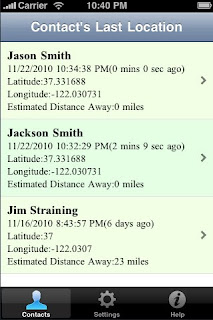 ContactsAt ContactsAtDescription Ever wonder where your phone contacts are at? Then this app is for you! Contacts@ provides a very simple, secure and useful way to find where you phone contacts are located, how far they are away, their previous locations, and when they were there. Who can view your location? -The person must be in your contact list. -You also must be in their contact list. -You both need this app -It's that simple Features: - When the app is started your current location is saved and shared with other app users that are in your contact list -Information is obtained from your existing contact list, so you don't have any additional users to manage, which makes this app very simple and easy to use. -List of contacts is sorted by date. Most recent contact's location is displayed first. -View previous locations for each of your contacts, not just the most recent. -The only people that can view YOUR location are people that are in YOUR contact list. -Distance away from you is displayed for each contact. -Date, time and how long ago the user was at a location is displayed. -Latitude/longitude is displayed for each location. -Ability to change the accuracy of your built in GPS/Location technology. -Map with your contacts selected location is displayed. -Time displayed for your contact's location is converted to your appropriate time zone. Some Ideas For Using this app: -Next time your waiting for visitors and want to know how far away they are. -Emergency officials use this app to know where your fellow partners are at easily and quickly? -Going out for a date or meeting friends for dinner, use this app to know how far your date is away? -You can use this app to monitor your own locations and prove to somebody you were at a certain place at a certain time. -Use this app to keep track of where your employees that travel are located. -Use this to keep track of where your kids are. -Use this app when traveling to see how far you traveled througout the day. -Anything else you can think of! Enjoy! What's new in Version 1.0.0.3 Changed app title and minor tweaks to gui Category: Productivity Version: 1.0.0.3 0.1 MB LANGUAGES: English REQUIREMENTS: Compatible with iPhone, iPod touch, and iPad. Requires iOS 3.1.3 or later Download here iLogger IPA Version 2.3.2 iLogger iLoggerDescription iLogger is the only app you will need to log and record all of your activities. If it happened, you can log it. User definable logs allow you to keep track of the events you want and how you want them. iLogger comes with sample logs to get you started quickly but you can set it up any way you desire to fit your needs. NOTE: There is a free lite version of "iLogger" so you can try before you buy. The only difference is the free version has a limit of 15 entries. Here is a small list of things you can keep track of: • Food / Diet / Calories • Exercise / Fitness • Running / Jogging / Biking / Hiking • Car Maintenance • Gas Mileage • Consulting time / Work • Project construction • Trip Diary • Flight Log • Dive Log • Swim Log • Medical / Medication • Money • Ham Radio • Anything you want to keep track of Quickly import your existing logs directly from your computer. You can also export your logs from iLogger directly to your own computer or via email. Built-in backup and restore to/from your own computer ensures you always have a copy of your data. Quickly find your events using iLogger's powerful filtering, searching, and sorting capabilities. Data entry is made easy with autofill, quick copy, and complete landscape support on most screens. iLogger allows you to enter the following types of data: • Text • Note/Comment • Date • Time • Duration • Currency • Count • Number • Yes/No • Web Address • Email Address • Phone Number • Location (GPS, address, city, etc.) • Voice Memo • Calculated (use basic math on other attributes and values) • Lookup List (user defined list of values) Store up to 10 images for each of your entries. Use existing images or take a photo with the built-in camera (if available). Share your data with others. Email logs to co-workers or friends and family. Other users of iLogger can import your shared logs directly simply by tapping a link in the email. Customize entry lists to display exactly the data you want to see. Apply colors to logs or individual entries to make them stand out. See a summary of the entry list you are viewing. Shows entry count and totals and averages of your data. Generate a report of your logs viewable on your computer. Includes a print friendly version of your entries. Protect access to your data with a passcode. Keep others out of your data. The passcode feature functions just like the version built into your iPhone or iPod Touch. The Tools menu gives you access to: • Data Transfer (Backup, Restore, Import, Export, Reports) • Lookup List maintenance • Settings (Display Options, Sorting Options) • Passcode Lock • Contact Information • Help Information UPGRADING FROM LITE VERSION: If you are updating from iLogger Lite v2.0 or greater you can easily transfer your data by tapping the Transfer button under Tools. If you wish to transfer data from iLogger Lite v1.0.1 or earlier you need to do a backup to your computer from the Lite version then restore that same data into your copy of the Full version. PRIVACY NOTE (iOS 3.1.3 only): Due to the implementation of email attachments, exported item lists sent via email are stored on an external server. This data will not be reviewed by me and will NEVER be given to anyone. What's new in Version 2.3.2 Changes • Decimal attributes now use a decimal keypad for easier entry (iOS 4.2 or later). Bug Fixes • Filters based on multi-select lookup lists now work as expected. • Display of long calculated attribute formulas. • Formatting of Integer and Decimal attribute values. Category: Productivity Version: 2.3.2 2.5 MB LANGUAGES: English REQUIREMENTS: Compatible with iPhone, iPod touch, and iPad. Requires iOS 3.1.3 or later Download here iDatabase IPA Version 4.0 iDatabase iDatabaseDescription A database manager that offers the most natural and easy way to organize information and data. With this database for iPhone and iPod touch, you can manage membership lists, expenses, projects, keep track of your internet accounts and much more! You can choose from 16 ready to use and easy to personalize database templates to organize any type of information or you can create a totally new database from scratch. Imagine it's 19:51 on Valentines day. The book store closes in 9 minutes and you forgot to pick up your girlfriend's present. You lucky dog! You carry a list of her all time favorite authors right there in your pocket! In other situations, you can manage membership lists, expenses, projects, keep track of your internet accounts and more. TEMPLATES INCLUDED Choose from 16 ready to use database templates which you can personalize to fit your needs. The following templates are included: Accounts; Classes; Computers; Contacts; Customers; Events; Exercise Log; Expenses; Inventory; Movie Catalog; Membership List; Mobile Phones; Notes; Projects; Recipes; To Do; Vehicle Maintenance. SUPPORTED FIELDS The type of field you can create for your data are: Small Text, Large Text, Number, Date, Time, Date and Time, Image, Item Picker and calculation. You can also use a special field type named Separator Field, to divide a record into distinct visual parts. - Small Text Field: use small text fields to store characters of letters, symbols, and numbers used as text in a single line of text without scrolling bar. - Large Text Field: use large text fields to store characters of letters, symbols, and numbers used as text in a multi line of text with scrolling bar. - Number Field: use number fields to store numbers. - Date Field: use date fields to store dates. - Time Field: use time fields to store time. - Date and Time Field: use Dae and Time fields to store a date and time together to reference a fixed point in calendar time. - Image fields: use image fields to store images. - Choose Field: use item picker fields to present a list of mutually exclusive choices. Item picker fields are used as a means of selecting one choice from a list of two or many. - Separator Field: use separators to divide a record into distinct visual parts. - Calculation Field: use calculation fields to present the result of a arithmetic operation between number fields content. A calculation field can be a result of addition, multiplication, ratio and subtraction. SYNC/EXPORT/IMPORT AND BACKUP iDatabase works as a free standing app and can be synchronized via Wi-Fi with iDatatabase for Mac (sold separately). The app supports Backup and Restore, Exporting and Importing of databases in .idatabase and .CSV formats via the service online Dropbox. The .idatabase files preserve the complete content and structure of the database, including pictures and they can also be used by Mac version of iDatabase. YOUR DATA IN YOUR POCKET With iDatabase in your pocket you'll stay on top of your personal information and never end up in the dog house again! INTERNET CONNECTION NOT REQUIRED The main features of the app does not require any Internet connection. SUPPORT For any product information, please contact our support, we are happy to provide information about our software and technical assistance: www.apimac.com/support Application icon by MacPremium; interface icons by Glyphish.com. What's new in Version 4.0 - Ability to duplicate a database containing all the records. - Ability to create a clone without records of an existing database. - Ability to export a database by email. - Ability to send one or more records via email as PDF, as a card or as a CSV file. - Ability to navigate through the records with new Previous and Next buttons. - New import database window that let user to define fields, field labels and to see a preview of the records prior to import. - Ability to set the first record as field labels or as the value of the record, both in import and export. - Support for importing files in Semicolon Separated and Tab Delimited format. - Support for importing and exporting files in Unicode UTF-16, UTF-8, Mac OS Roman, ASCII and ISO Latin 1. - Exporting and importing templates. - Optimized synchronization functionality between Mac and iPhone. - Various changes to the user interface to increase ease and convenience of use. - User interface improvements. - Various performance and reliability improvements. - Addressed all know bugs. Category: Productivity Version: 4.0 2.0 MB LANGUAGES: English, Italian REQUIREMENTS: Compatible with iPhone, iPod touch, and iPad. Requires iOS 3.0 or later Download here Documentz™ (with Screen Share, Print and Fax) Description IPA Version 2.5 Documentz™ (with Screen Share, Print and Fax) Documentz™ (with Screen Share, Print and Fax)Description Reviews: It does connect directly to WIFI printers easily which is terrific and best implementation I've seen in an app - Serchr, Feb 8, 2010 Documentz™ is a comprehensive suite of productivity applications focused on document handling and sharing. Consisting of multiple compatible and interwoven modules, Documentz™ enables document storage, viewing, sharing, printing, faxing, emailing and more. Printing does not require installation of any companion software on your PC. Faxing does not require a subscription or signup. * Documentz™ also enables users to print directly to Fedex Office (formerly known as Kinko's). * Documentz™ also features mobile-to-mobile document and screen sharing. Features include: * A comprehensive Documents module, complete with a Documents Viewer with support for a wide array of document types, including PDF, MS Word, Excel, Microsoft PowerPoint, JPEG, TIFF, PNG, and many more. * Documents Module supports faxing, printing, and emailing. The Documents Module also includes support for uploading existing documents from your computer, as well as creating new ones on the iPhone. * Document and Screen Sharing between iPhones and iPods. Mobile to mobile phone screen sharing as well as Mobile to PC screen display is enabled. * Direct printing to networked printers (no computer required!), and also to Mac and linux shared printers. No companion software installation necessary. * Faxing globally to over 250 countries and territories worldwide. Documentz™ has native support for practically all types of documents, including Adobe PDF, Microsoft Word, Excel, Bitmap, TIFF, Text, HTML, Open Office documents, GIF, encapsulated post script, and much more. No subscription or signup required. Includes 4 free fax units. Additional fax units can be obtained on-demand via In-App purchase. * Attach and send multiple documents via email. * Print documents directly to Fedex Online (formerly known as Kinko's). Fedex Office is the expert at printing manuals, presentations and business documents, with over 1800 locations worldwide. * Flexible PC Access for documents on the iPhone, via both WebDAV and regular web browsers. * And much more. Documentz™ consists of 6 functional modules: 1. Documents Module (Store, Share, View, Print, Fax, Email, etc) 2. mRemote (Share documents between phones, view remote mobile screens via phone or pc) 3. Mail Module (Create, store, recall and send emails and notes with multiple attachments) 4. Fax Center (Manage Faxes and Cover Sheets, View Fax Status, etc) 5. Print Online (Print direct to Fedex Online (Kinko's)) 6. Downloader (Download web documents, access and display web pages). What's new in Version 2.5 - MobileMe login bug fix - Printing and overall performance enhancements Category: Productivity Version: 2.5 17.4 MB LANGUAGES: English REQUIREMENTS: Compatible with iPhone, iPod touch, and iPad. Requires iOS 3.0 or later Download here GV Connect - Call & SMS client for Google Voice IPA Version 1.6 GV Connect - Call & SMS client for Google Voice GV Connect - Call & SMS client for Google VoiceDescription NOTE: An existing Google Voice account with a GV phone number is required to use this application - signup for new Google Voice accounts is currently limited to residents of the US. Please note that GV Connect is NOT a VoIP application and will thus not allow making or receiving calls from an iPad or iPod Touch without a separate VoIP application. GV Connect is the most feature-complete Google Voice application available for your iPhone or iPad - interact with your existing "Google Voice" accounts much faster than using the web interface: • Place calls using your Google Voice number rather than your mobile number - enter number directly, select a contact from your device's contacts, or call back any number in your history. The application supports direct call, callback, and offline calling (see application website for a description of these calling modes). • Send and receive text messages (SMS) from your Google Voice number - including support for long SMS exceeding 160 characters. • Listen to voicemails and recorded conversations right on your device (allowing you to pause, rewind, or fast forward to any point within the message) - voicemails will also show the transcription of the message when available. • Un/-archive messages, mark them as un-/read or starred, attach notes to conversations, block/unblock senders, or delete conversations. • Easily search in your history by contact, message, or note text. • Messages are stored on your device for offline access (data is cached for all accounts used in the application). • Composing notes and text messages can be done in landscape mode. • Quickly change various Google Voice account settings (call forwarding, do-not-disturb — including the option to have DND automatically expire at a specified time, message notifications, …) or even add additional calling credit directly from within the application. • Automatic checking for new messages while the application is active. • Direct access to your device's contacts without needing to synchronize them with Google. • Quick access to favorite phone numbers. • Universal application which runs optimized on both, iPhone/iPod Touch and iPad. • Integrates with Talkatone (requires iOS 4.0 or higher) to allow placing outgoing VoIP calls using your Google Talk account. GV Connect stores your account password securely in your device's Keychain for faster login when launching the application. All communication is done via secure connections (SSL) to the Google Voice servers only and no contact information (other than the contact's phone number which is required to place a call or send a message) is sent to Google. All operations are fully synchronized with your Google Voice account. Please read the FAQ section on the application's website if you encounter any issues or use the feedback email link in the application's about screen to ask for support. What's new in Version 1.6 • Add support for GV's "Archive" feature - SMS and voicemails are now split between the Inbox and Archive in the application to better mimic the website interface and provide a less cluttered Inbox • Allow forwarding of individual SMS conversations and voicemail messages via email • Change swipe action in SMS and voicemail lists from delete to un-/archiving of the selected conversation • Support for additional actions on SMS and voicemail conversations (un-/archive, mark as un-/read, forward as email) - options can be accessing using a long tap in the message list or using the More… button at the bottom of a conversation • Improve reliability when using the 'Direct Call' option • SMS recipient and message can no longer be edited while the message is currently being sent • Various improvements for VoiceOver accessibility This app is designed for both iPhone and iPad. Category: Productivity Version: 1.6 1.2 MB LANGUAGES: English REQUIREMENTS: Compatible with iPhone, iPod touch, and iPad. Requires iOS 3.0 or later Download here Doodle for iPhone IPA Version 1.40 Doodle for iPhone Doodle for iPhoneDescription Find the right date and time for a group of people to meet with Doodle’s virtually effortless scheduling! This is an iPhone optimized front end for the powerful Doodle web interface where anyone (with any mobile device or desktop computer) can participate in schedules and polls. • Official Doodle (doodle.com) iPhone application • iPhone users may still use Mobile Doodle website! • (Read more about this on the product website FAQ) Doodle easy scheduling now available for the iPhone and iPod touch: Find the right date and time for a group of people to meet and enjoy Doodle’s virtually effortless scheduling the iPhone way! Doodle for iPhone supports all essential features known from the web version: • Easily participate in any poll by tapping on its participation link anywhere on your iPhone (e.g. in Mail) • Initiate and track meeting requests from your iPhone, wherever you are • Invite participants using your iPhone address book • Optimized result view suggesting the best option for your meeting • Communicate with participants using the comments feature • Quick participation with the “All Options” or “None of the Options” button • Easy access and overview from your dashboard • Connect your MyDoodle account to stay in sync with your web dashboard About Doodle The world’s leading online scheduling tool, Doodle takes the pain out of finding the right date and time for a group of people to meet and makes scheduling virtually effortless. The basic service is available for free on www.doodle.com with neither registration nor software installation required. More information What's new in Version 1.40 - Retina Display Support - Multitasking Support Category: Productivity Version: 1.40 4.0 MB LANGUAGES: English, Dutch, French, German, Italian, Spanish REQUIREMENTS: Compatible with iPhone, iPod touch, and iPad. Requires iOS 3.0 or later Download here Awesome Note (+Todo) IPA Version 4.9.1 Awesome Note (+Todo) Awesome Note (+Todo)Description ✔ Finally, combine notes with to-dos in one app! ✔ App Store Essentials Hall of Fame - featured by Apple Awesome Note is an innovative note taking application and to-do manager that allow you to combine notes with to-do flexibility. Awesome Note enables you to customize its look with themes the way you want it to be displayed with different folder icons, colors, fonts and paper backgrounds. From easy-to-use regular notes to notes with multiple photo attachments, To-Do Notes to organize your day, Post-It style Quick Memo to quickly jot down your thoughts, sending notes with photo attachments as email, and synchronization with Google Docs / Evernote, Awesome Note provides some powerful features. Jot down your ideas, thoughts and memos, and create daily diary, travel diary, email box, checklist, shopping list, to-do list, scheduler and anything else you want and sort them into custom categories with Awesome Note. With Awesome Note, you can easily and quickly organize your life better than ever. "iPhone default Notes app can safely be retired" - From user ✔ KEY FEATURES!! - Insert images into notes - Insert a map into notes - To-do notes - Alarms (Notifications) (iOS 4) - Calendar view in every folder - Full sync with Google Docs and Evernote - Transfer notes to Evernote and Google Docs - Clickable links (web/email address, phone number) in read-only mode - Customize notes and folders (icon, font, theme) - Passcode protection for each folder and startup. - Thumbnail/List/Todo/Diary view in every folder - Email notes directly from the app - Full Landscape Support - Full Text Search - Quick Memo (Text and handwriting) - Bluetooth Note Transfer - Backup over Wi-Fi - Send notes via text message (SMS) (iOS 4) - Print note (iOS 4.2) [Intuitive User Interface] - Simple and easy to use - No Internet connection required - Full support Landscape mode - Lock the display screen from rotating [Organize into folders] - Create, edit and save notes into categories. - Customize folders with cool color choices and unique icons - Create, edit and delete folders - Access to all notes in All Note category [Customize notes] - A wide variety of theme backgrounds - Easily change backgrounds - Choose font and font size for each note [To-do notes] - GTD-friendly to-do notes - Set due date, repeating and priority - Checklist, shopping list, to-do list - Repeating to-dos - Badge on main screen - Alarm to-dos [Post-it style Quick Memo] - Quickly access up to four sticky memos - Text and Handwriting - Save as notes [Easy note-taking] - Fast input - Quickly add memos and notes - Edit your own note title - Cut, copy, paste and undo/redo - Provides a button to close keyboard [Multiple View and Sorting] - Thumbnail/List/To-do/Diary view mode for each folder - Sort notes by name, date created, date modified, due dates and priorities What's new in Version 4.9.1 Fixed crash on launch bug Category: Productivity Version: 4.9.1 22.0 MB LANGUAGES: English, Chinese, Dutch, French, German, Italian, Japanese, Korean, Russian, Spanish, Swedish REQUIREMENTS: Compatible with iPhone, iPod touch, and iPad. Requires iOS 3.0 or later Download here App Toolkit - 85 in 1 IPA Version 1.1.1 App Toolkit - 85 in 1 App Toolkit - 85 in 1Description ONE for ALL, All in ONE!! Limited time on sale ! The very first-must-have app for iPhone users. A toolkit that can combine your working days, school days, and even holidays altogether. With profession tools and software, you could efficiently deal with everything including business, school works, and even issues in your daily life. Are you looking for a powerful, functional, and most importantly, low-price app to assist you every day? This is your chance to have a worth one!! 85+ apps in ONE!! Only $0.99 to have them all assist you finishing kinds of tasks. Continuously update. Support iPhone 4 Retina Display Multi-functions, time-saving, space-keeping, and LOW price! At our first release, the following 80+ apps are included in 7 useful categories: Business 1.PDF Reader & Scanner (large file support) 2.Virtual MIC Pro 3.Business Name Card 4.Camera Zoom Pro 5.Currency Exchange 6.Big Notes Pro (note, journal, and diary) 7.Unit Converter 8.Password Manager 9.Walk and Text 10.Secure Wallet 11.Schedule Reminder Utility 1.Battery Monitor 2.System Monitor 3.Handy Level 4.Party Lighter 5.Service Bell 6.Thief Alarm 7.Police Sound 8.Fake Call 9.Fake Text 10.Fake Miss Call 11.Fake Alerts 12.Buzzer 13.MyStrobe Measurement 1.Altimeter 2.BAC Calculator 3.BMI Tracker 4.Calculator 5.Digital Scale Pro 6.Ruler 7.Tap Counter 8.Tip Calculator 9.Timer Life Tools 1.Alarm Clock Pro 2.Cocktails Recipes 3.Flashlight Pro 4.Find My Car 5.Find My Location 6.Female Calendar 7.Holiday & Event 8.Shopping List Pro 9.Zip Code 10.Scribble Pen 11.Food Calories 12.iLed 13.Countdown 14.Timezones Entertainment 1.Balance Ball 2.Classical Dart 3.Dice Shaking 4.Electric Shaver 5.Flip Coins 6.Metronome 7.Push Beer 8.Random Number 9.Relax Music 10.Mini Piano 11.Guitar Tuner 12.Top noise 13.Painter 14.Airhorn Language 1.Language Translator 2.Spell Check Pro (dictionary) 3.Wisdom Quotes 4.Chinese Wordbook 5.Spanish Wordbook 6.Japanese Wordbook 7.German Wordbook 8.Italian Wordbook 9.French Wordbook Web Tool 1.MultiTab Browser 2.Facebook Tool 3.google book 4.google doc 5.Gmail 6.google news 7.google reader 8.google talk 9.google buzz 10.google calendar 11.igoogle 12.google latitude 13.Twitter Tool 14.Rss Reader 15.Yahoo What's new in Version 1.1.1 - add 2011, 2012 holidays - performance tuning - fixed minor bu Category: Productivity Version: 1.1.1 306 MB LANGUAGES: English REQUIREMENTS: Compatible with iPhone, iPod touch, and iPad. Requires iOS 3.1.2 or later Download here KwikList Plus IPA Version 2.5 KwikList Plus KwikList PlusDescription KwikList Plus is a simple and powerful list management tool that will help you organize your life. Customize, share or hide, and edit all of your lists from one convenient spot. You’ll always have your lists with you on your iPad, iPhone, or iPod Touch. Get rid of the sticky notes and throw away those bits of paper. Click “...More” to learn why you should download this App today! You’re a list maker. You’ve got grocery lists, errand lists, lists of meetings, contacts and soccer schedules. Then of course, there are the ever-growing lists of things to do for home and work. Your fridge, desk and dashboard are adorned with curling sticky notes that eventually dry up and fall to the floor, but that’s okay because you create new ones each week. You have such an impressive number of lists that you don’t even really see them anymore. Once in a while, you clean out your car and find a piece of paper under the seat. It’s a list of things you wanted to do once you got to the office – two months ago. That’s just one more problem with your list system. The one you want is often lost or someplace else. You forget to grab the one you need off the counter before leaving home; rush to the meeting so fast that you leave your list of points behind. There must be an easier way to get organized! Now, there is. KwikList Plus is a powerful, flexible tool that puts list management in one place, right at your fingertips on your iPad, iPhone, or iPod Touch. Create as many lists as you need and kiss inefficiency good-bye. KwikList Plus lists can be customized to look and act just the way you want them to. The app provides you with templates for common types of lists – to do, gifts, pictures, notes and others – or you can choose to create a fully custom list with whatever item-fields you need to track. Don't need one of the fields for an item? Remove it. Need to record more information for an item? Add a new field by selecting a new text, note, contact, image, date, or time. You can add or remove any of the fields, so you have exactly what you need to keep track of things. When you complete a task, just check it as done. Need to share your list with somebody else? Email the whole list or just the details of a specific item. Don't want to share? Optional password protection lets you restrict access to a list that you don't want others to see. These are some of the amazing, flexible, and easy-to-use features of KwikList Plus: * Easily create all the lists you need, in one place, and locate them easily by assigning any one of the more than 40 list icons. * Choose from one of the built-in list templates or create your own custom list. * Customize the fields that you need for each item; track what you need to track. * Add pictures from your picture library to your items. * Add contacts from your address book to your items, then use your item to navigate to the contact details and call them or email them. * Search for items across all of your lists or search only within a specific list. * Email your lists, email your items. * Sort your list using the sort button or by shaking the device. * Restrict access to private lists with optional password protection. * Control where new items are added to a list; top or bottom. * Optionally move checked items to the bottom of the list automatically with Auto Sort. * Optionally include an additional list field in the display of the item. * Optionally prompt for the value of a list field when marking items as checked. * Use your device in either portrait or landscape mode. BACKUP, RESTORE, and SYNC your data with DropBox! If you have lists, you need KwikList Plus. Go ahead and download this incredible app now but be warned. It occasionally takes folks a bit of time to get used to the idea of being so conveniently organized and efficient. User Guide now available for download from the support site. This app is designed for both iPhone and iPad. Category: Productivity Version: 2.5 1.2 MB LANGUAGES: English REQUIREMENTS: Compatible with iPhone, iPod touch, and iPad. Requires iOS 3.1 or later Download here MarkdownMail - Send HTML Email IPA Version 2.1.1 MarkdownMail - Send HTML Email MarkdownMail - Send HTML EmailDescription MarkdownMail is the easiest way to compose and send HTML emails on your iPhone, iPad or iPod touch. Based around John Gruber's popular Markdown markup syntax, you can now send emails with bold text, italics, bulleted lists and more. MarkdownMail will convert your Markdown formatted messages into an HTML message that you can send to your friends, family or colleagues. FEATURES - Write HTML emails using the Markdown markup syntax - Save drafts of your messages - Preview your message before sending - Email Markdown formatted content to your Tumblr or Posterous blog - Export your generated HTML content to MailChimp - Copy generated HTML to pasteboard - View Markdown syntax in-app - TextExpander touch support - Free customer support via email REQUIREMENTS - iPhone or iPod touch running iOS 4, iPad running iOS 3.2 Thank you! What's new in Version 2.1.1 Thank you for supporting MarkdownMail. We've been hard at work in the Second Gear garage making a new version that adds many features of the features you've requested. * [NEW] Added support for exporting your content to MailChimp * [NEW] Added 'Other Apps' section to Help & Support screen * [FIX] TextExpander snippets should refresh when MarkdownMail re-enters foreground on iOS 4 and greater. * [FIX] iOS 4.2 fixes for iPad If you enjoy MarkdownMail, please be sure to rate each new version 5 stars on the App Store. High reviews from our customers ensure future updates to apps and allow new customers to see how many people enjoy MarkdownMail. Thank you! This app is designed for both iPhone and iPad. Category: Productivity Version: 2.1.1 1.2 MB LANGUAGES: English REQUIREMENTS: Compatible with iPhone, iPod touch, and iPad. Requires iOS 3.2 or later Download here Control Time IPA Version 1.0 Control Time Control TimeDescription Do you constantly feel like you should be working when you're trying to relax? Do you feel anxious about the things you're not doing? Control Time is the tool you need to create a balanced routine for work, play, and passion. It allows you to clearly and proactively define how you will spend your time. Once you have a clear sense of how you're spending your time, you'll no longer have to worry about what you're not getting done. You'll know that you've set aside time for your responsibilities and for your personal life. Control time is good for: * Working from home * Creating new habits * Making time for personal projects * Managing work/life balance It will help you if you are: * Freelancing * Working from home * Trying to lose weight * Trying to create a new habit * Working on a side project Control Time's allows you to: * Create a daily routine for each day of the week. The most successful people have steady routines. * See what activity you should be doing right now. Wondering "What should I do now?" often leads to procrastination. * Add recurring checklists. To make sure you've taken care of your daily responsibilities. * See how much time you spend on each activity throughout a week so you can prioritize. * Easily reorder activities. The reason why paper and software calendar solutions don't work is that they're, ironically, too time consuming. Control Time isn't. Control Time will help you restore your work/life balance. It will help you figure out how to set aside time for yourself - for new projects, new goals, new habits. Category: Productivity Version: 1.0 0.2 MB LANGUAGES: English REQUIREMENTS: Compatible with iPhone, iPod touch, and iPad. Requires iOS 3.1.2 or later Download here Zendre IPA Version 1.0 Zendre ZendreDescription Zendre provides a simple and elegant way to set resolutions and goals and keep track of your progress. A beautiful user interface guides you into entering your resolutions and either setting a goal for them, or leaving an open end. From that moment on, you can add progress points to each one of your resolutions, until you succeed in achieving your goals. Use Zendre as an every day reminder of the resolutions and goals you have set for the new year, and for your life in general. Every time you act in a way that supports one of your resolutions, open the app and add a point to it. We hope that Zendre will assist you in reaching all your goals. Category: Productivity Version: 1.0 2.8 MB LANGUAGES: English REQUIREMENTS: Compatible with iPhone, iPod touch, and iPad. Requires iOS 3.1.3 or later Download here Smart Reminder: Quick and easy way for adding calendar events IPA Version 1.5 Version 1.5 Smart Reminder: Quick and easy way for adding calendar events Smart Reminder: Quick and easy way for adding calendar eventsDescription Smart Reminder is a very useful application that adds events to iPhone’s system calendar in a very fast and easy way. It is based on "quick buttons" you can adjust to your needs in app's preferences and simple "all on one screen" idea for adding your events. All of this immensely shortened the time needed to add the event quick and comfortable. Just few taps... and it is done! If you use MobileMe, it syncs just in few seconds with your computer's calendar like iCal or MS Outlook. ONCE YOU TRY SMART REMINDER- YOU NEVER USE ANYTHING INSTEAD! Supported languages: - English - Français (French) - Deutsch (German) - 簡體字 (Chinese) - 简体字 (Chinese Simplified) - Nederlands (Dutch) - Italiano (Italian) - Español (Spanish) - Português (Portuguese) - Dansk (Danish) - Svenska (Swedish) - Suomi (Finnish) - partly: full support next update - Norsk (Norwegian) - 日本語 (Japanese) - 한국어 (Korean) - Русский (Russian) - Polski (Polish) - Čeština (Czech) - Slovenčina (Slovak) - Magyar (Hungarian) - Ελληνικά (Greek) - Türkçe (Turkish) - עברית (Hebrew) It works on iPhone/iPod Touch with iOS 4 installed. Features: - quick buttons' extended mode (button title and description seperately) - quick events' preview (tap and hold the calendar day to display) - quick calendar change (with system calendar's color mark) - quick duration time change - quick alert change - iCal, Outlook calendar sync (MobileMe) - 23 languages support - iPhone 4 Retina Display support Smart Reminder to aplikacja dodająca zdarzenia do systemowego kalendarza iPhone'a w bardzo prosty i szybki sposób. Wystarczy kilka tapnięć i zdarzenie zostanie dodane bez potrzeby specjalnej koncentracji i odrywania się od ważnych spraw... po prostu tapiesz kilka razy i zdarzenie zostaje dodane. Jeśli używasz MobileMe, zdarzenia zsynchronizują się w kilka sekund z kalendarzem Twojego komputera. Moc aplikacji leży w „szybkich przyciskach”, które można dowolnie dodawać i dostosowywać do swoich potrzeb. W preferencjach można ustawić domyślne czasy przypomnienia o zdarzeniach i pory dnia w zależności od Twoich potrzeb, trybu życia lub rzeczy, które robisz na codzień. Możesz również zmienić domyślny czas trwania zdarzenia lub przypomnienia w trakcie dodawania zdarzenia, nie wydłużając czasu potrzebnego na jego dodanie. Aplikacja umożliwia również szybki podgląd zdarzeń zapisanych na danych dzień oraz zmianę kalendarza "w locie". Wszystko po to, by maksymalnie skrócić czas dodawania zdarzeń. Obsługiwane języki: - angielski - francuski - niemiecki - chiński - holenderski - włoski - hiszpański - portugalski - duński - szwedzki - fiński - norweski - japoński - koreański - rosyjski - polski - czeski - węgierski - grecki - turecki - hebrajski - słowacki Aplikacja działa na iPhone/iPod Touch i wymaga oprogramowania w wersji iOS 4. Główne cechy aplikacji: - tryb rozszerzony szybkich przycisków (umożliwia dodanie osobno tytułu przycisku i opisu zdarzenia) - podgląd zdarzeń na dany dzień (tapnij i przytrzymaj dzień w kalendarzu by zobaczyć podgląd) - zmiana kalendarza w trakcie dodawania zdarzenia jednym ruchem palca - zmiana czasu trwania zdarzenia i czasu przypomnienia "w locie" - synchronizacja z iCal, Outlook (MobileMe) - obsługa 23 języków - interfejs dostosowany do wyświetlaczy Retina (iPhone 4) What's new in Version 1.5 bug fix for default options of adding events Category: Productivity Version: 1.5 1.0 MB LANGUAGES: English, Chinese, Czech, Danish, Dutch, Finnish, French, German, Greek, Hebrew, Hungarian, Italian, Japanese, Korean, Norwegian, Polish, Portuguese, Russian, Slovak, Spanish, Swedish, Turkish REQUIREMENTS: Compatible with iPhone, iPod touch, and iPad. Requires iOS 4.0 or later. Download here OnTime IPA Version 1.1 OnTime OnTimeDescription OnTime: the one smartphone app intent on improving your quality of life – one reminder and one route at a time. OnTime is a patent-pending, location-based calendar application (smartphone app) that securely syncs with your existing calendar, provides timely reminders, maps your route, notifies you of traffic delays, and can alert your next appointment if you’re running late. The purpose of OnTime is quite simple: to help busy individuals get from one place to the next – on time, every time. The OnTime application complements your computer-based calendar and is different from other reminder services because OnTime takes into account your current location, the location of your next appointment, and traffic patterns in order to provide you with a more accurate alert. It can essentially become your GPS device. Other features of OnTime include email and sms notifications of late or OnTime arrival, social network integration, and turn by turn directions. What's new in Version 1.1 OnTime now allows you to save locations for calendar events owned by other colleagues, friends, and family members. Category: Productivity Version: 1.1 2.5 MB LANGUAGES: English, French, German, Spanish REQUIREMENTS: Compatible with iPhone, iPod touch, and iPad. Requires iOS 4.0 or later. Download here iTeleport: Jaadu VNC for iPhone iPad IPA Version 5.0.1 iTeleport: Jaadu VNC for iPhone / iPad iTeleport: Jaadu VNC for iPhone / iPadDescription iTeleport: a magical app that lets you access your computer from anywhere in the world. Supports Mac, Windows, Linux, and AMX Touchscreen Interfaces. See your computer screen and control its keyboard and mouse from wherever: a few feet away, or even halfway around the world. April 26: New Update! - Native iPad support - Redesigned remote with simultaneous screen view - Use iTeleport Connect on your desktop for zero configuration setup (no need for router port forwarding or anything else) - Cut/Copy/Paste support, along with REMOTE COPY! - FULL SCREEN MODE -- do a 3-fingered upwards swipe to hide the tool bars! iTeleport: Jaadu VNC is what many have called the best iPhone application ever... ...unbelievably wicked! -- David Pogue, New York Times ...a winning application. -- The Washington Post Best. iPhone. Application. Ever. -- The Boy Genius Report (More reviews and video demos are at iTeleportMobile.com) User reviews: Best app ever. Bravo. ...you'll be amazed. It works incredibly well over 3G. So cool! Really quite amazing... they took an almost perfect app and made it perfect... if there was a 10 star rating, that is what I would give this app.. Far superior to Mocha Teleport yourself to your computer from anywhere in the world. With its intuitive and patent-pending interface, iTeleport gives you full control of your computer's mouse and keyboard, and provides a rich visual display of your computer screens, without any screen resolution limit. iTeleport is currently the only application with AUTOMATED SETUP, for both local and connect from anywhere" connectivity. * Control any application on your Mac or Windows PC desktop from anywhere in the world * Visit Flash-based websites from your iPhone (video/audio streaming is not supported) * Access your computer's files from anywhere * Advance PowerPoint slides while reading your presenter notes * Control your media player from anywhere * Use your iPhone as a wireless touchpad + keyboard + media remote * If you're parent, watch over your child's online behavior to make sure they're safe * Supports Ctrl-Alt-Del and other combination keystrokes * Supports Mac (Snow Leopard, Leopard, Tiger, Vine Server) and all Windows editions (with free VNC servers: TightVNC, UltraVNC, and RealVNC). Also supports Linux VNCServer and Vino, as well as AMX Touchscreen Interfaces. * SSH Encryption support for all platforms. For details, visit www.iTeleportMobile.com/support/secure * Supports VPN-based encryption * Bluetooth keyboard support * Supports VGA out (requires iOS 3.2 or higher) Visit www.iTeleportMobile.com for setup instructions and usage tips. You can even use iTeleport when you don't have an Internet connection, and want to control your laptop while giving a presentation. Also, iTeleport can handle very high resolution displays, e.g. dual Apple Cinema displays at 5120x1600. What's new in Version 5.0.1 Add Home tab Controls cheat sheet Save Screenshot feature (on Options screen when connected via Internet tab) This app is designed for both iPhone and iPad. Category: Productivity Version: 5.0.1 11.5 MB LANGUAGES: English REQUIREMENTS: Compatible with iPhone, iPod touch, and iPad. Requires iOS 3.0 or later Download here iOS 4 Secrets - Tips & Tricks for iPhone & iPod Touch IPA Version 1.3 iOS 4 Secrets - Tips & Tricks for iPhone & iPod Touch iOS 4 Secrets - Tips & Tricks for iPhone & iPod TouchDescription The hidden secrets of iOS™4 unveiled! Do you know what amazing things you can do with the world's most innovative mobile operating system? Grab iOS 4 Secrets and get ready to be blown away! Tap on the Check List in it to know what awesome new features you get to enjoy when updated to iOS™4! Do yo know how all the tips and tricks of our device, like how to email more effectively, save juice, browse better? Do you also know that if you've lost your iPhone, you can even get it back? Looking to get the most of your iPhone and iPod touch? There are SO MUCH about your iPhone that you do NOT know! Major Features: ★ A HANDY SET OF TIPS ★ The latest iOS™4 tips, more on the way in the update. Hundreds of tips and tricks for iPhone/iPod touch. 6 Categories, covering battery saving tips, shortcuts, SMS & Emails, net browsing, and safety tips and some easily neglected tricks. Save favorite tips to your list for a quicker reference. Include tips for iPhone 3GS users only. ★ CHECK LIST ★ With Apple's iOS™4 comes a LOAD of groundbreaking functions for mobile devices which you'll probably never see within the next few years. Sadly, not all features are compatible with all devices. The latest operating system may or may NOT fully compatible with your iPhone or iPod touch. Will updating to iOS™4 be best for you and your device? LET'S CHECK OUT and let this auto checker get things done for you! This is how iOS 4 Check List works: The app automatically examine the model of your device, then identifies its type. It lists all the major user features of the latest OS 4 and check if YOUR iPhone/iPod touch fully supports them. Let's see what you'll get from iOS™ 4. ★ IT FEELS RIGHT ★ Gorgeously designed user interface. Intuitive user experience. Well-organized and simple to use, flip through tips. learn shortcuts, discover hidden features, secure your data and maximize your battery life. What's new in Version 1.3 26 TIPS ADDED Category: Productivity Version: 1.3 9.3 MB LANGUAGES: English, Chinese REQUIREMENTS: Compatible with iPhone, iPod touch, and iPad. Requires iOS 3.0 or later Download here Photoshop PSD Viewer IPA Version 1.0 Photoshop PSD Viewer Photoshop PSD ViewerDescription * FREE FOR 1 DAY! * Opening Adobe Photoshop PSD document files on iPhone? Impossible? Until now. When you install PSD Viewer on your iPhone you will be able to open PSD files from Mail, Safari or any other application that supports opening files in external utilities (for example DropBox). PSD Viewer is using ISO standard color management to properly display any PSD file. Currently supported color models are Grayscale, RGB, CMYK and CIE Lab in both 8 and 16-bit variants All previously opened PSD files are archived for faster access inside the PSD Viewer. [Version 1.2 is already in progress and will be available in early 2011. This version will offer even more features like layers interaction, printing, sharing and basic image editing. If you have any ideas or feature requests, feel free to visit our website and contact us by e-mail. This new version will be probably a little bit more expensive, but if you already own version 1.0 you are guaranteed a free update.] Category: Productivity Version: 1.0 2.7 MB LANGUAGES: English REQUIREMENTS: Compatible with iPhone, iPod touch, and iPad. Requires iOS 3.1.3 or later Download here Air To-Do:Attractive,Intuitive and Sleek To-Do list manager IPA Version 1.2 Air To-Do:Attractive,Intuitive and Sleek To-Do list manager Air To-Do:Attractive,Intuitive and Sleek To-Do list managerDescription Attractive, Intuitive and Sleek To-Do List Manager!!! Air To-Do is an Efficient, Easy to Use, To-Do List manager. It enables you to share your to-do’s and related notes with your friends via Twitter & Facebook in an incredibly simple and intelligent way. You can - Write to-do items - Set due dates, times and alert - Add URL’s to reference any information related with to-do’s - Add memos - Add pictures or photos to spark memory - Add location information You can also easily share your information with - Twitter, Facebook, Text Messages and Email Post information with the powerful Twitter and Facebook upload function. You can post your to-do’s and notes with photos and location maps. You’ll find it amazingly straight-forward, clever and smooth. You can: - Add unlimited number of to-do’s and notes - Set due date as today, tomorrow or any other day - Set due time - Alarm notification with iOS4 - Add unlimited character memo notes - Add photos directly from your iPhone/iPod touch or camera - Add photos from photo library - Add location information with map - Map supports standard, satellite and hybrid versions - Bookmark your favorite location and reuse it - Backup & Restore - Badge on the App icon You can share all your information including: - Text - Due dates - Memos - Photos - Location maps If you share your content via Twitter and/or Facebook, photos and map images will upload seamlessly to TwitPic and a url will be added automatically. Instantly upload your information in appealing formats without any additional steps. What's new in Version 1.2 - Due Date Alert - Backup and Restore - Badge on the App Icon - Various Bug Fixes Category: Productivity Version: 1.2 3.9 MB LANGUAGES: English, Korean REQUIREMENTS: Compatible with iPhone, iPod touch, and iPad. Requires iOS 3.0 or later Download here
Subscribe to:
Posts (Atom)
|